100% Pure Rust & GPUI · MIT Open Source 100% 纯血 Rust & GPUI · MIT 开源桌面客户端 Local-First · OS Keychain Encrypted 本地直连架构 · 系统原生密钥链加密

Where servers, object buckets, and cloud drives feel like one native filesystem.

让服务器、对象存储桶与个人云盘,拥有如本地文件系统般纯粹的原生体验。

Rustduck is a modern, GPU-accelerated cross-protocol desktop file transfer studio for Windows and macOS. Connect directly from your machine to SSH/SFTP, S3-compatible object storage, SMB/NAS, FTP/FTPS, WebDAV, Google Drive, and Microsoft OneDrive—with zero intermediary cloud servers.

Rustduck 是一款面向 Windows 与 macOS 的硬件加速跨协议桌面文件传输工作台。 从您的本地设备直连 SSH/SFTP、S3 对象存储、SMB/NAS、FTP/FTPS、WebDAV、Google Drive 与 OneDrive,零中转服务器、零隐私收集。

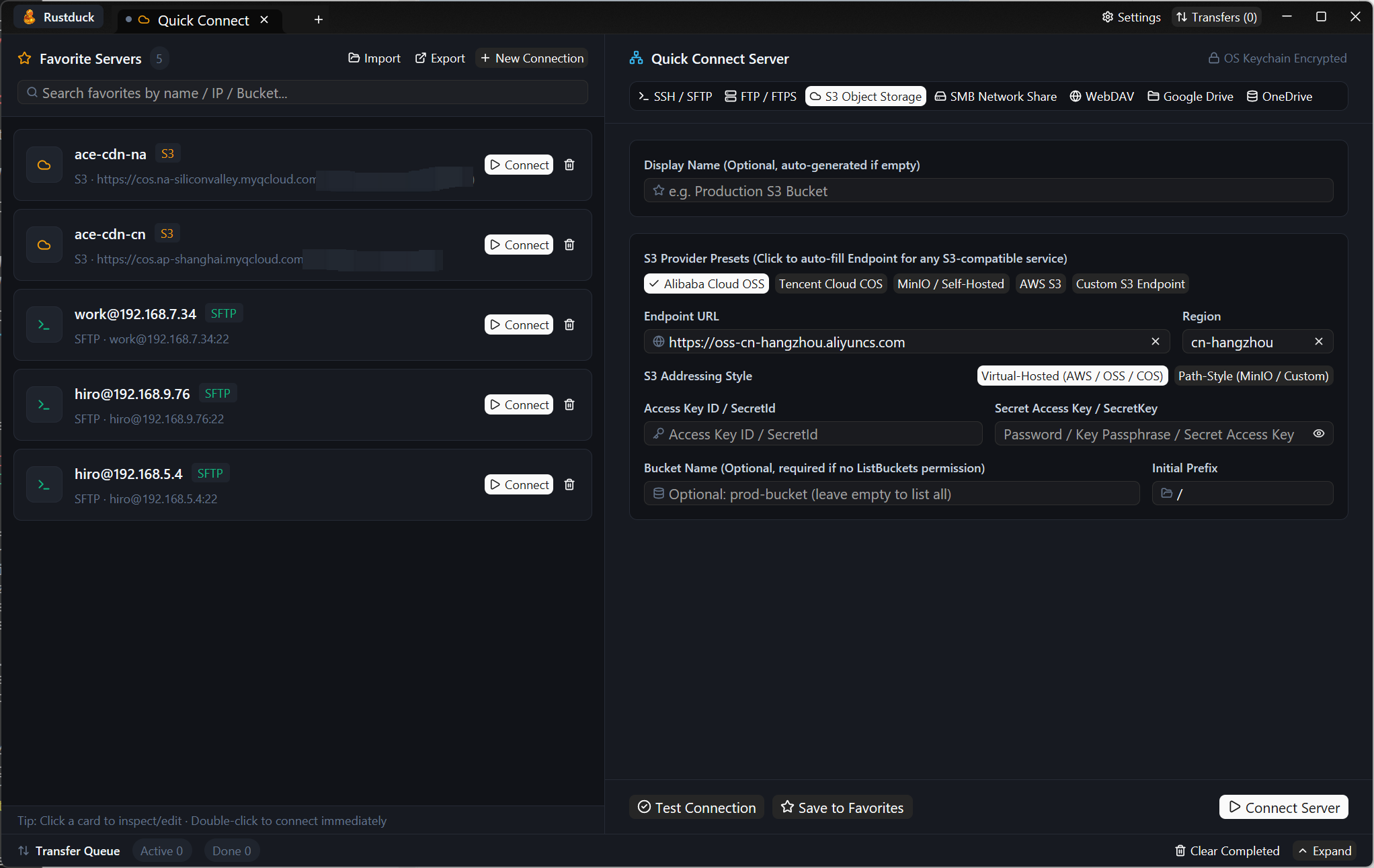
Rustduck Favorites and Quick Connect Studio interface
Favorites & Quick Connect Inspector — Manage multi-protocol servers, object buckets, and cloud drive connections with OS keychain credential protection. 收藏夹与快速连接工作台 — 集中管理多协议服务器、对象存储桶与云盘账号,敏感凭据由系统原生密钥链加密托管。
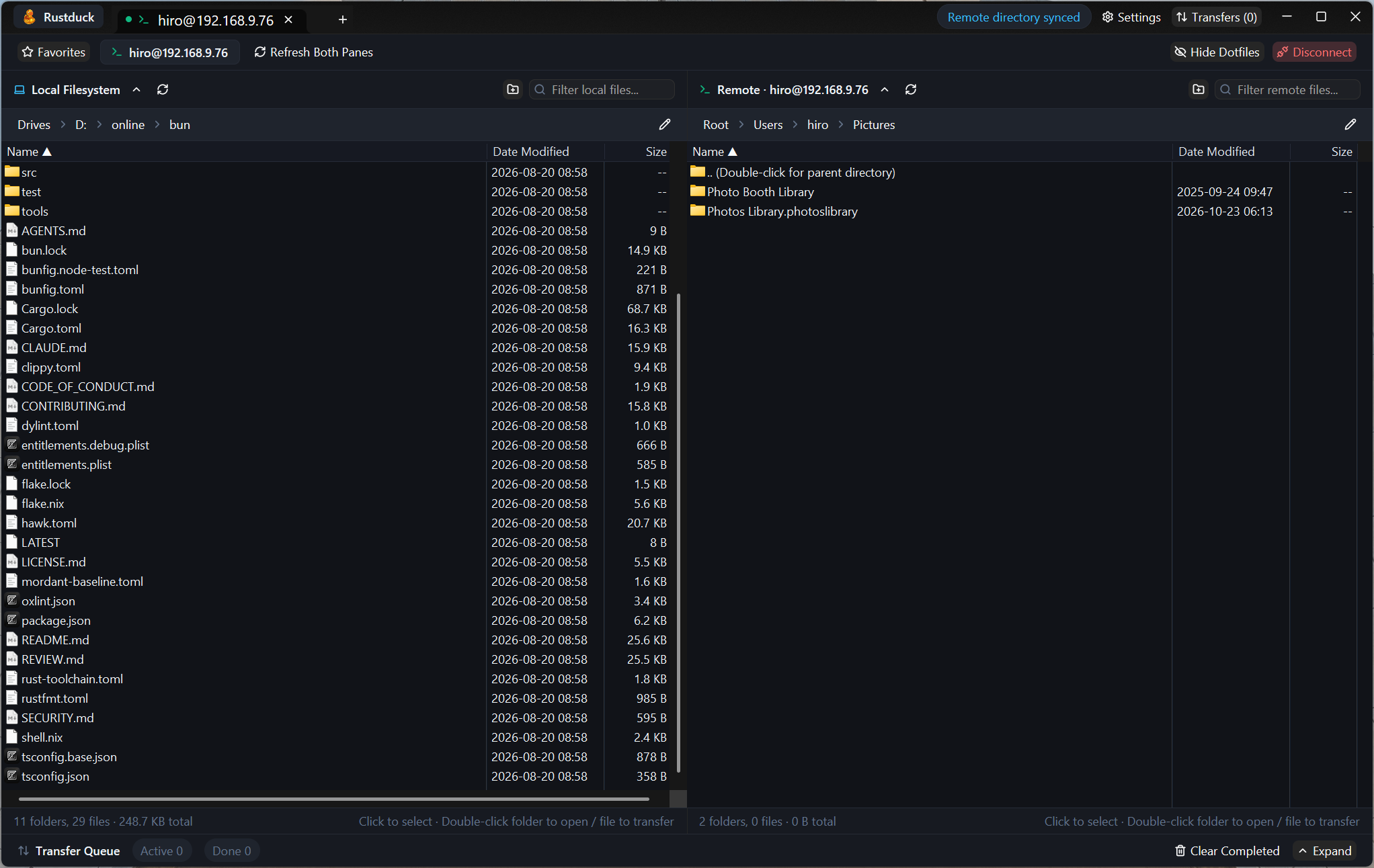
Rustduck Dual-Pane Native File Transfer Workspace
Dual-Pane Native Transfer Workspace — Side-by-side local and remote OS-native virtualized file views with drag-and-drop and real-time transfer queue tracking. 双栏原生文件传输工作区 — 本地与远程并排的操作系统级虚拟化文件列表,支持跨工作区直接拖拽与底部实时传输队列。
Core Philosophy
核心设计理念

Engineered for speed, native ergonomics, and local-first security

兼具现代 GPU 渲染质感、操作系统原生列表性能与本地安全隔离

Rustduck eliminates heavy Electron/WebView wrappers and legacy runtime dependencies in favor of a single native Rust binary.

告别臃肿的 Electron 套壳与复杂的动态库依赖,Rustduck 编译产物仅为一个轻快、纯粹的原生可执行程序。

1. One Studio for Every Storage Layer

1. 统一的多协议双栏工作台

Inspect Linux server logs over SSH/SFTP, publish release artifacts to S3 buckets, mount SMB NAS shares, or manage Google Drive and OneDrive archives using one consistent dual-pane workflow.

无论是通过 SSH/SFTP 排查日志、向 S3 存储桶上传构建产物、挂载局域网 SMB NAS,还是管理 Google Drive 与 OneDrive,均遵循一致的左右双栏直觉交互。

2. GPU Chrome + OS-Native File Views

2. GPU 工作台 + OS 真原生列表

Combines GPUI hardware-accelerated chrome with virtualized OS-native controls—Win32 SysListView32 on Windows and AppKit NSTableView on macOS—for instant scrolling across 100,000+ entries.

独创 GPUI 硬件加速界面与操作系统原生虚拟化列表控件(Windows SysListView32 / macOS NSTableView)混合架构,十万级目录依然丝滑滚动并支持系统拖拽。

3. Pure Rust, Zero OpenSSL Baggage

3. 纯血异步 Rust,零外部运行时

Every protocol engine in Rustduck is built with memory-safe async Rust (tokio + rustls). No OpenSSL DLL conflicts, no background daemon, and full per-connection HTTP/HTTPS/SOCKS5 proxy support.

所有协议栈均基于内存安全的异步 Rust(tokio + rustls)构建,无后台常驻守护进程,内置全局及单连接级 HTTP / HTTPS / SOCKS5 代理隧道。

4. OS-Native Credential Vault

4. 系统原生凭据库加密保护

Passwords, SSH passphrases, S3 Secret Keys, and OAuth 2.0 refresh tokens are encrypted inside Windows Credential Manager or macOS Keychain—never stored in plaintext config files or uploaded to external servers.

密码、SSH 私钥口令、S3 SecretKey 以及 Google Drive / OneDrive 的 OAuth 刷新令牌均加密保存在 Windows 凭据管理器或 macOS 钥匙串中,绝不明文落盘或上传第三方服务器。

Supported Ecosystem
协议生态支持

Seven storage protocols in a single native client

一个原生客户端,打通七大主流存储协议

Protocol 协议类型 Capabilities & Highlights 核心能力说明
SSH / SFTP Password & Ed25519 / RSA private key auth (~/.ssh/), keepalive & auto-reconnect, recursive transfers 支持密码与 Ed25519 / RSA 私钥认证(自动解析 ~/.ssh/)、SSH 心跳保活与断线重连、递归目录传输
FTP / FTPS Plain FTP and explicit/implicit TLS via rustls, passive-mode streaming uploads and downloads 支持标准 FTP 与显式/隐式 TLS(rustls),支持被动模式流式上传与下载
S3 Object Storage Presets for AWS S3, Alibaba Cloud OSS, Tencent Cloud COS, Cloudflare R2, MinIO & custom endpoints; Canned ACLs; 8 MiB multipart uploads 内置 AWS S3、阿里云 OSS、腾讯云 COS、Cloudflare R2、MinIO 预设;支持自定义 Canned ACL 与 8 MiB 并发分片上传
SMB (v2 / v3) Pure-Rust SMB2/3 client for Windows File Shares, Samba, and Synology / QNAP NAS 纯 Rust 实现的 SMB2/3 客户端,无缝连接 Windows 共享目录、Samba 及群晖 / 威联通 NAS
WebDAV Nextcloud, ownCloud, Synology WebDAV, and standard HTTP/HTTPS PROPFIND / PUT / MKCOL servers 兼容 Nextcloud、ownCloud、群晖 WebDAV 及标准 HTTP/HTTPS WebDAV 服务
Google Drive System browser OAuth 2.0 PKCE loopback login, direct Drive v3 REST API file management, HTTP/HTTPS/SOCKS5 proxy support 拉起系统浏览器完成 OAuth 2.0 PKCE 本地回环授权,直连 Google Drive API 进行文件管理,支持代理访问
Microsoft OneDrive Microsoft Graph API v1.0 with browser OAuth 2.0 PKCE loopback authorization and proxy support 基于 Microsoft Graph API v1.0,支持系统浏览器 OAuth 2.0 PKCE 本地回环授权与代理配置
Transparency & Google API Compliance
数据安全透明度与 Google API 合规声明

How Rustduck Handles Google Drive & User Data

Rustduck 如何处理您的 Google Drive 及账号数据

Rustduck is a 100% client-side desktop application without any intermediary backend or telemetry servers. When you connect a Google Drive bookmark in Rustduck:

Rustduck 是一款纯本地运行的桌面客户端软件,不设任何中转后端或遥测收集服务器。当您在 Rustduck 中连接 Google Drive 时:

  • Direct Device-to-Google Connection: OAuth 2.0 authorization (with PKCE loopback) happens in your system browser directly with accounts.google.com. All file operations communicate directly between your computer and www.googleapis.com over HTTPS/TLS.
  • Why Drive Scope (https://www.googleapis.com/auth/drive) Is Requested: As a full-featured file manager and transfer client, Rustduck needs permission to list folders, download existing files, upload new files, rename, move, create directories, and delete items across your Google Drive workspace—only when explicitly triggered by your actions.
  • Local Encrypted Token Storage: OAuth refresh tokens are stored exclusively on your local computer inside Windows Credential Manager or macOS Keychain. Neither Rustduck developers nor Eclosion ever receive, view, or store your tokens or files.
  • Google API Limited Use Compliance: Rustduck's use and transfer to any other app of information received from Google APIs strictly adheres to the Google API Services User Data Policy, including the Limited Use requirements.
  • 本地设备直连 Google 官方接口:OAuth 2.0 PKCE 授权在您的系统默认浏览器中直接与 accounts.google.com 完成,所有文件浏览与传输均在您的电脑与 www.googleapis.com 之间通过 HTTPS/TLS 加密直连传输。
  • 权限用途说明(https://www.googleapis.com/auth/drive):作为通用双栏文件管理器,Rustduck 仅在您主动操作时使用该权限浏览云盘目录、上传与下载文件、新建文件夹、重命名、移动或删除文件。
  • 令牌本地安全托管:OAuth 令牌仅加密存储在您本机的 Windows 凭据管理器或 macOS 钥匙串中,开发者没有任何服务器接收或保存您的凭据与文件。
  • 严格遵守 Google Limited Use 政策:Rustduck 对从 Google API 获取的信息的使用与传输严格遵守 Google API 服务用户数据政策(包括“有限使用 / Limited Use”要求)。